Input
This section describes input handling for YVR devices.
YVR Controller Input Mapping
This reference section describes how to map YVR controller actions (such as thumbstick presses) to input events or controller events.
Input Bindings
Access the input mapping in Unreal from Edit > Project Settings > Engine > Input.
Action mappings are used for key presses, and Axis mapping describe inputs that have a range.
The following image shows an example Action Mapping settings.
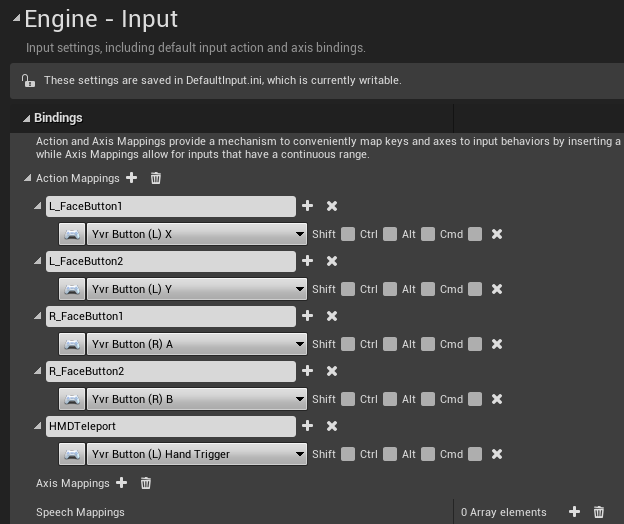
YVR Button and Touch
Thumbstick press, touch and release actions
- Yvr Button (L) Thumbstick - The left controller thumbstick Pressed and Released events. In order for the Pressed event to fire, the thumbstick must be pressed to the point of clicking.
- Yvr Button (R) Thumbstick - The right controller thumbstick Pressed and Released events. In order for the Pressed event to fire, the thumbstick must be pressed to the point of clicking.
- Yvr Touch (L) Thumbstick - The left controller thumbstick Touched and Released events.
- Yvr Touch (R) Thumbstick - The right controller thumbstick Touched and Released events.
- Yvr Button (L) Thumbstick X - The left controller thumbstick analog value of the X axis. The Axis Value returns a floating point value, from 0.0 to 1.0, where 0.0 is not pressed, and 1.0 is fully pressed.
- Yvr Button (R) Thumbstick X - The right controller thumbstick analog value of the Y axis. The Axis Value returns a floating point value, from 0.0 to 1.0, where 0.0 is not pressed, and 1.0 is fully pressed.
- Yvr Button (L) Thumbstick Y - The left controller thumbstick analog value of the X axis. The Axis Value returns a floating point value, from 0.0 to 1.0, where 0.0 is not pressed, and 1.0 is fully pressed.
- Yvr Button (R) Thumbstick Y - The right controller thumbstick analog value of the Y axis. The Axis Value returns a floating point value, from 0.0 to 1.0, where 0.0 is not pressed, and 1.0 is fully pressed.
Thumbstick up press and release actions
- Yvr Button (L) Thumbstick Up - The left controller Thumbstick Up Pressed and Released events.
- Yvr Button (R) Thumbstick Up - The right controller Thumbstick Up Pressed and Released events.
Thumbstick down press and release actions
- Yvr Button (L) Thumbstick Down - The left controller Thumbstick Down Pressed and Released events.
- Yvr Button (R) Thumbstick Down - The right controller Thumbstick Down Pressed and Released events.
Thumbstick left press and release actions
- Yvr Button (L) Thumbstick Left - The left controller Thumbstick Left Pressed and Released events.
- Yvr Button (R) Thumbstick Left - The right controller Thumbstick Left Pressed and Released events.
Thumbstick right press and release actions
- Yvr Button (L) Thumbstick Right - The right controller Thumbstick Right Pressed and Released events.
- Yvr Button (R) Thumbstick Right - The right controller Thumbstick Right Pressed and Released events.
Index Trigger press, touch and release actions
- Yvr Button (L) Index Trigger - The left controller index trigger Pressed and Released events.
- Yvr Button (R) Index Trigger - The right controller index trigger Pressed and Released events.
- Yvr Touch (L) Index Trigger - The left controller index trigger Touched and Released events.
- Yvr Touch (R) Index Trigger - The right controller index trigger Touched and Released events.
- Yvr Button (L) Index Trigger Axis - The left controller index trigger analog value. The Axis Value returns a floating point value, from 0.0 to 1.0, where 0.0 is not pressed, and 1.0 is fully pressed.
- Yvr Button (R) Index Trigger Axis - The right controller index trigger analog value. The Axis Value returns a floating point value, from 0.0 to 1.0, where 0.0 is not pressed, and 1.0 is fully pressed.
Hand Trigger press and release actions
- Yvr Button (L) Hand Trigger - The left controller hand trigger Pressed and Released events.
- Yvr Button (R) Hand Trigger - The right controller hand trigger Pressed and Released events.
X or A button press, touch and release actions
- Yvr Button (L) X - The left controller X button Pressed and Released events.
- Yvr Button (R) A - The right controller A button Pressed and Released events.
- Yvr Touch (L) X - The left controller X button Touched and Released events.
- Yvr Touch (R) A - The right controller A button Touched and Released events.
Y or B button press, touch and release actions
- Yvr Button (L) Y - The left controller Y button Pressed and Released events.
- Yvr Button (R) B - The right controller B button Pressed and Released events.
- Yvr Touch (L) Y - The left controller Y button Touched and Released events.
- Yvr Touch (R) B - The right controller B button Touched and Released events.
Haptics for YVR Controllers
This reference section describes how to control haptic effects on YVR controllers with Unreal Blueprints.
Unreal Simple Haptics
Use the Set Haptics by Value blueprint start and stop haptics for a controller.
To start, update, or end vibration call Set Haptics by Value in the frame you want to make the change and define the frequency and amplitude of the haptic response.
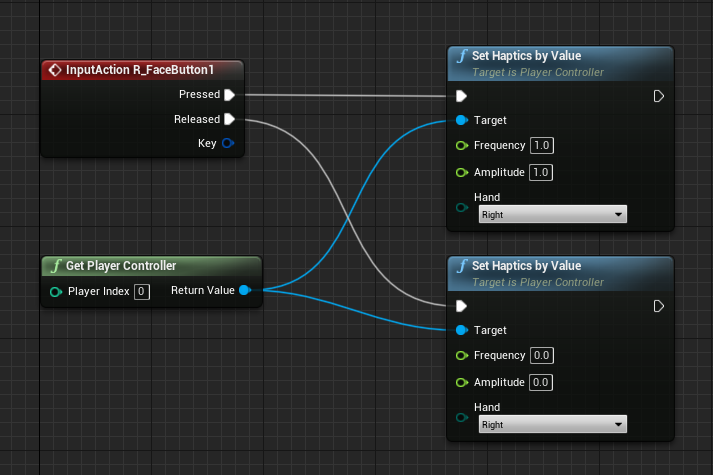
Expected values for amplitude and frequency are any floating point value between 0.0 to 1.0, inclusive. The greater the value, the stronger or more frequent the vibration in the controller. To end the vibration, set both amplitude and frequency to 0.0. Controller vibration automatically end 2 seconds after the last input.
Sample
The Basic Sample sample project sets you up to create a basic scene using YVR Unreal SDK. It is a simple Unreal project that demonstrates how to use the YVR Unreal SDK to create a VR application.
Please follow the steps to view the sample:
Open the
VRTemplate.uproject.Connect to YVR device.
Select Launch to start the sample project.